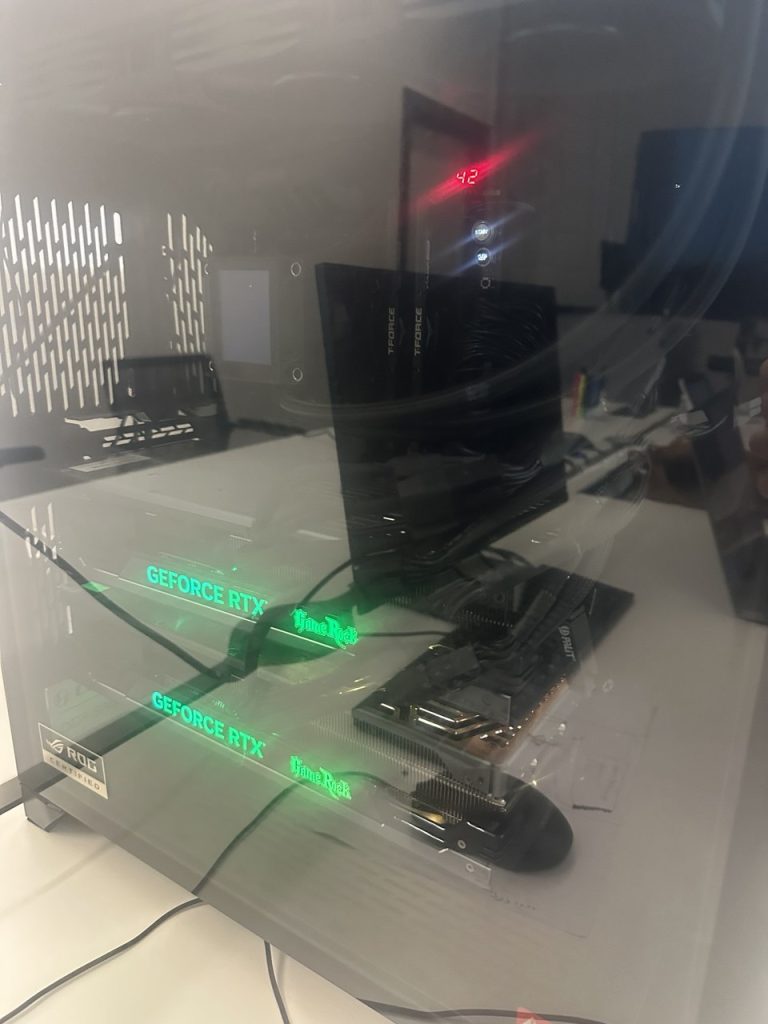
Graphics (The Heart): Dual Nvidia RTX 4080 GPUs
Let’s cut through the hype: most AI research assumes you have a massive budget, but in my homelab, reality is measured in GPU temps and Python execution speed. I’m stripping away the fluff to see which ‘frontiers’ actually matter when you’re running on bare metal. Let’s see what’s worth our compute cycles.
If you’ve spent any time reading my thoughts over at AI Frontiers, you know I have a bit of an obsession with what’s “under the hood.” For me, AI isn’t about flashy prompts or talking to a black box; it’s about the linear algebra, the stochastic processes, and the raw optimization theory that makes the magic happen.
But here’s the thing: you can’t truly dismantle the “black box” of AI if you’re always renting someone else’s brain.
For the longest time, I relied on cloud instances. It’s the standard advice, right? “Don’t buy hardware, just use AWS or Lambda Labs.” But as an independent researcher, I found that the cloud creates a psychological barrier to experimentation. When the “meter is running” at $2.00 an hour, you don’t take risks. You don’t try that weird, non-standard optimization path. You play it safe.
To truly bridge the gap between abstract theory and functional code—a core mission of mine—I needed a local powerhouse. So, I built one. Here is the “why” and the “how” behind my dual-RTX 4080 workstation.
The Philosophy of the AI Build: VRAM is the Currency of Research
In AI research, VRAM (Video RAM) isn’t just a spec; it’s your ceiling. If you don’t have enough, you simply can’t load the model. While the RTX 4090 is the darling of the internet, the current market is… let’s just say, volatile.
I opted for Dual Nvidia RTX 4080s. This gives me a combined 32GB of high-speed GDDR6X VRAM.
Why two cards instead of one? Because it forces me to deal with Model Sharding and Parallelism. If I want to reconstruct a groundbreaking paper from scratch and the model is too big for a consumer card, I have to understand how to “slice” that model. This is where the math meets the metal.
The Architecture: Ubuntu and the Bare Metal
I run this on Ubuntu Linux. No WSL2, no Windows overhead. When you are tracking the pulse of AI from conferences like ICLR or NeurIPS, you’re looking at code that is native to Linux. Ubuntu gives me direct access to the CUDA drivers and the NCCL (NVIDIA Collective Communications Library) backend, which is essential for making two GPUs talk to each other without a massive latency penalty.
Getting Technical: Sharding and Distributed Inference
One of my goals is Implementation-First Research. When a new LLM architecture drops, I want to see the loss curves on my own hardware. To do that with 32GB of VRAM across two cards, I use DeepSpeed or PyTorch’s Fully Sharded Data Parallel (FSDP).
Here’s a look at how I actually initialize a large model across both 4080s. This isn’t just about running code; it’s about understanding how tensors are distributed across the PCIe bus.
Python
import torch
import torch.nn as nn
from torch.distributed.fsdp import FullyShardedDataParallel as FSDP
from torch.distributed.fsdp.fully_sharded_data_parallel import CPUOffload, BackwardPrefetch

def setup_sharded_model(model):
    """
    My approach to fitting massive architectures into dual 4080s.
    We shard the model parameters, gradients, and optimizer states.
    """
    if not torch.cuda.is_available() or torch.cuda.device_count() < 2:
        print("This rig requires dual GPUs for the full sharding experience.")
        return model

    # Initializing the model on the primary device
    model = model.to(0)

    # Wrap the model in FSDP. This is where the 'math' of
    # memory management happens.
    sharded_model = FSDP(
        model,
        device_id=torch.cuda.current_device(),
        # Offload to 64GB System RAM if we hit the 32GB VRAM limit
        cpu_offload=CPUOffload(offload_params=True),
        backward_prefetch=BackwardPrefetch.BACKWARD_PRE,
        # Using mixed precision (BF16) to squeeze more out of the 4080s
        mixed_precision=torch.distributed.fsdp.MixedPrecision(
            param_dtype=torch.bfloat16,
            reduce_dtype=torch.bfloat16,
            buffer_dtype=torch.bfloat16
        )
    )
    return sharded_model

# Example of a custom training step focusing on manual gradient scaling
def research_train_step(model, batch, optimizer):
    optimizer.zero_grad()

    # Moving data to the GPU (The IO bottleneck I always talk about)
    inputs, labels = batch[0].to(0), batch[1].to(0)

    outputs = model(inputs)
    loss = nn.functional.cross_entropy(outputs, labels)

    # In a dual-GPU setup, backward() triggers the NCCL sync
    loss.backward()
    optimizer.step()

    return loss.item()
The “Unsung Heroes”: CPU and Data Throughput
While everyone stares at the GPUs, I spent a significant portion of my budget on the 10+ Core CPU and 64GB of RAM (which I’ll likely scale to 128GB soon).
In my mathematics-heavy workflow, the CPU isn’t just a passenger. It handles the Stochastic Preprocessing. If your CPU can’t keep up with the data augmentation—shuffling tensors, normalizing images, or tokenizing text—your expensive GPUs will just sit there “starving.” This is a classic optimization problem.
I use an M.2 NVMe SSD (2TB) for active research and a 6TB HDD for long-term storage of model weights. When you’re downloading checkpoints from HuggingFace daily, you’d be surprised how fast 2TB disappears.
Local Research vs. The Black Box
There is a certain “intellectual transparency” that comes with local hardware. When I’m on the ground at a conference, and someone claims a new optimization technique, I don’t want to wait to “get home and log into AWS.” I want to know that my rig is ready for a 48-hour training run the moment I land.
Running on Ubuntu also allows me to use Docker to create reproducible environments. If I’m reconstructing a model from a paper, I can lock down the library versions exactly as the authors intended.
Python
# A quick utility I use to monitor VRAM pressure across my dual setup
def print_gpu_utilization():
    import nvidia_smi
    nvidia_smi.init()
    for i in range(torch.cuda.device_count()):
        handle = nvidia_smi.nvmlDeviceGetHandleByIndex(i)
        info = nvidia_smi.nvmlDeviceGetMemoryInfo(handle)
        print(f"GPU {i} [{nvidia_smi.nvmlDeviceGetName(handle)}]:")
        print(f"  Used: {info.used / 1024**2:.2f} MB / {info.total / 1024**2:.2f} MB")

# If you see one GPU at 99% and the other at 10%, you've failed the
# implementation-first test. Balance is everything.
Final Thoughts: The Power of Independence
This setup—the dual 4080s, the high-performance CPU, the Ubuntu “bare metal”—is my laboratory. It’s where I dismantle the hype and look for the truth in the equations.
Is it overkill for most people? Probably. But if you’re driven by the mechanics of intelligence, and you want to see the “why” behind the “how,” you need to own your compute. Don’t just read the paper. Shard the model. Run the loss curves. Break the code until you understand the proof.
That’s how I move the frontier forward—one epoch at a time.
Leave a Reply