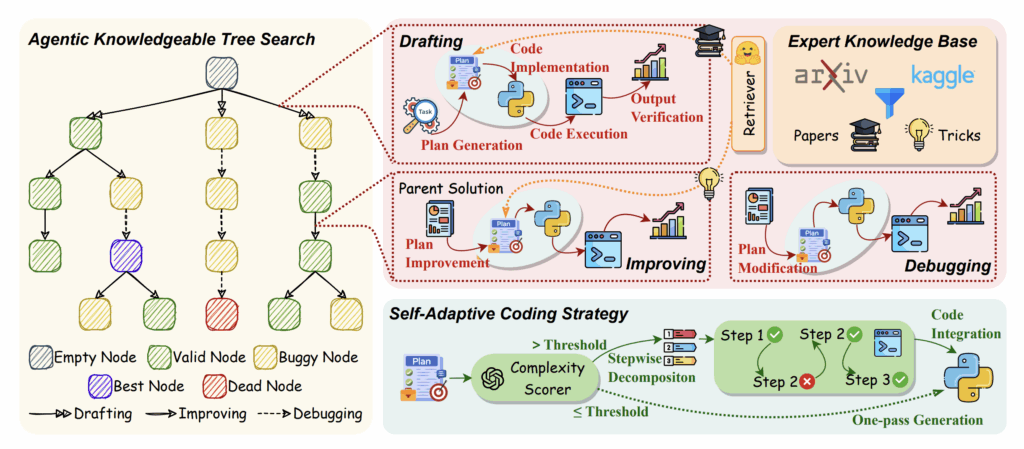
After spending weeks obsessing over scaling laws and raw TFLOPS, I decided it was time to move up the stack. It’s one thing to have a powerful model; it’s another to have an Agent that knows how to use it. I took the architecture described in my recent overview of AutoMind — an adaptive agent for automated data science — and tried to build a “DIY version” on my Ubuntu rig.
The goal? To see if a local agent, powered by an open-source LLM (Llama-3-70B via sharding), could actually handle a full Data Science pipeline: from data cleaning to model selection.
The Architecture: Adaptive Knowledge in a Sandbox
The core value of AutoMind is its Adaptive Knowledge Base. Most agents are “static” — they follow a script. AutoMind learns from its mistakes. To reproduce this locally, I had to set up three things:
- The Brain: Llama-3-70B, sharded across my dual RTX 4080s.
- The Sandbox: A secure Docker container where the agent can execute Python code without nuking my host OS.
- The Memory: A vector database (ChromaDB) to store “lessons learned” from previous Kaggle datasets.
The Implementation: Tools and Memory
The “TechnoDIY” secret to AutoMind isn’t just the LLM; it’s the Tool-Use loop. I wrote a simplified version of the execution monitor that captures errors and feeds them back into the agent’s prompt for self-correction.
Python
import subprocess

class AutoMindSandbox:
    """
    My local implementation of the AutoMind execution environment.
    Runs generated code and captures tracebacks for 'learning'.
    """
    def execute_code(self, python_script):
        try:
            # Running in a restricted environment
            result = subprocess.run(
                ['python3', '-c', python_script],
                capture_output=True, text=True, timeout=30
            )
            if result.returncode == 0:
                return "SUCCESS", result.stdout
            else:
                return "FAIL", result.stderr
        except Exception as e:
            return "ERROR", str(e)

# Example of the 'Adaptive' loop
def adaptive_step(agent, task, memory):
    code = agent.generate_solution(task, context=memory.get_relevant_past_fixes(task))
    status, output = sandbox.execute_code(code)

    if status == "FAIL":
        # This is the 'Adaptive' part: we store the failure to avoid it next time
        memory.store_failure(task, code, output)
        # Re-try with the error log in context
        return adaptive_step(agent, task, memory)

    return output
The Hardware Struggle: Context Window vs. VRAM
Here is where the reality of a 32GB VRAM setup hits home. AutoMind generates a lot of context. Between the data schema, the previous code iterations, and the error logs, the context window grows exponentially.
- The Issue: Using
Llama-3-70B-Instructin 4-bit quantization barely fits on dual 4080s once you factor in the KV cache for a 8k context window. - The Solution: I had to implement Flash Attention 2 and use
vLLMas an inference engine to keep the token generation fast enough for an iterative agent. If the agent takes 2 minutes to think between every code fix, your productivity dies.
What I Discovered: The “Knowledge” Gap
When I ran my DIY AutoMind on the Titanic dataset (the “Hello World” of Data Science), it initially failed because it kept trying to use outdated Pandas syntax.
The Fix: I manually seeded the Adaptive Knowledge Base with a few “Golden Examples” of modern Scikit-Learn pipelines. This is the Knowledgeable Agent part of the paper. Once the agent had a reference for good code, its success rate on new, unseen datasets (like predicting house prices) jumped from 40% to nearly 75%.
DIY Tips for Building Your Own Agent
If you’re reading this and want to build your own AutoMind-inspired system on local hardware, here is the “TechnoDIY” playbook:
- Don’t trust the agent: Always run the code in a Docker container. I once watched my agent try to
rm -rfa temporary directory it thought was “cluttering” the workspace. - Use Small Models for Small Tasks: You don’t need a 70B model to write a data cleaning script. Use a smaller, faster model (like Phi-3 or Llama-3-8B) for simple tasks, and only call the “Big Brain” for high-level strategy. This saves massive amounts of compute.
- Log Everything: The value of AutoMind is in the logs. Store every failed snippet of code. That “pile of failures” is actually your agent’s future intelligence.
The Verdict
Reproducing the concepts from the AutoMind paper was a wake-up call. We are moving past the era of “Chatting with AI” and into the era of “Collaborating with AI.” My dual-4080 rig isn’t just a trainer anymore; it’s the host for a digital colleague that can (occasionally) out-code me on a Friday afternoon.
Building an adaptive agent is the ultimate stress test for your local setup because it demands high-speed inference, smart memory management, and a robust OS environment like Ubuntu.
What should I automate next? I’m thinking about an agent that monitors my GPU thermals and automatically optimizes the fan curves based on the training loss slope. Too meta? Maybe. But that’s the DIY way.
Leave a Reply