Category: Agentic and Autonomous Systems

This category is about Agentic and Autonomous Systems

  • A Nascent Taxonomy of Machine Learning in Intelligent Robotic Process Automation

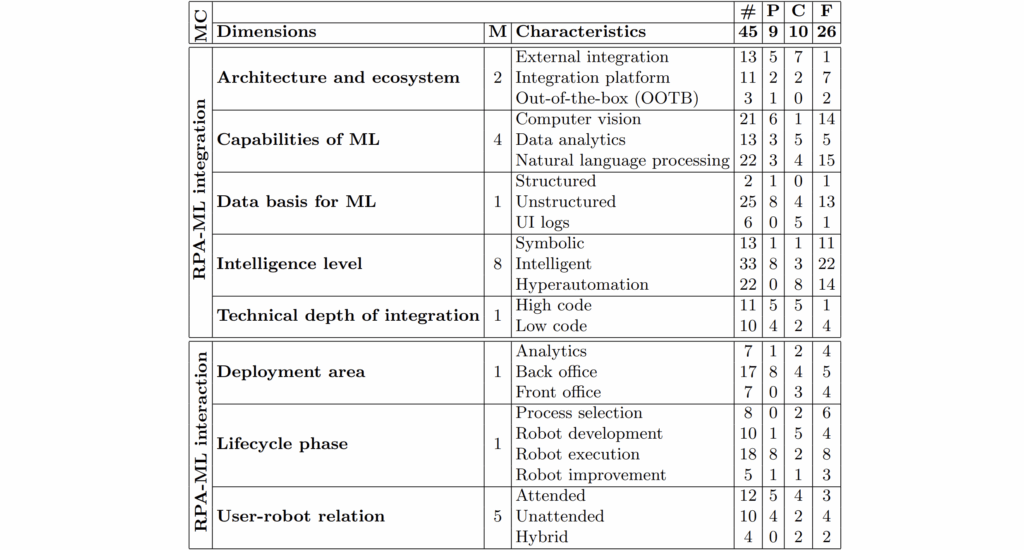
    Taxonomy of machine learning in intelligent robotic process automation.
Legend: MC meta-characteristics, M mentions, # total, P practitioner reports, C conceptions, F frameworks
    Taxonomy of machine learning in intelligent robotic process automation.
    Legend: MC meta-characteristics, M mentions, # total, P practitioner reports, C conceptions, F frameworks

    Recent developments in process automation have revolutionized business operations, with Robotic Process Automation (RPA) becoming essential for managing repetitive, rule-based tasks. However, traditional RPA is limited to deterministic processes and lacks the flexibility to handle unstructured data or adapt to changing scenarios. The integration of Machine Learning (ML) into RPA—termed intelligent RPA—represents an evolution towards more dynamic and comprehensive automation solutions. This article presents a structured taxonomy to clarify the multifaceted integration of ML with RPA, benefiting both researchers and practitioners.

    RPA and Its Limitations

    RPA refers to the automation of business processes using software robots that emulate user actions through graphical user interfaces. While suited for automating structured, rule-based tasks (like “swivel-chair” processes where users copy data between systems), traditional RPAs have intrinsic limits:

    • They depend on structured data.
    • They cannot handle unanticipated exceptions or unstructured inputs.
    • They operate using symbolic, rule-based approaches that lack adaptability.

    Despite these challenges, RPA remains valuable due to its non-intrusive nature and quick implementation, as it works “outside-in” without altering existing system architectures.

    Machine Learning: Capabilities and Relevance

    Machine Learning enables systems to autonomously generate actionable knowledge from data, surpassing expert systems that require manual encoding of rules. ML includes supervised, unsupervised, and reinforcement learning, with distinctions between shallow and deep architectures. In intelligent RPA, ML brings capabilities including data analysis, natural language understanding, and pattern recognition, allowing RPAs to handle tasks previously exclusive to humans.

    Existing Literature and Conceptual Gaps

    Diverse frameworks explore RPA-ML integration, yet many only address specific facets without offering a comprehensive categorization. Competing industry definitions further complicate the field, as terms like “intelligent RPA” and “cognitive automation” are inconsistently used. Recognizing a need for a clear and encompassing taxonomy, this article synthesizes research to create a systematic classification.

    Methodology

    An integrative literature review was conducted across leading databases (e.g., AIS eLibrary, IEEE Xplore, ACM Digital Library). The research encompassed both conceptual frameworks and practical applications, ultimately analyzing 45 relevant publications. The taxonomy development followed the method proposed by Nickerson et al., emphasizing meta-characteristics of integration (structural aspects) and interaction (use of ML within RPA).

    The Taxonomy: Dimensions and Characteristics

    The proposed taxonomy is structured around two meta-characteristics—RPA-ML integration and interaction—comprising eight dimensions. Each dimension is further broken down into specific, observable characteristics.

    RPA-ML Integration

    1. Architecture and Ecosystem

    • External integration: Users independently develop and integrate ML models using APIs, requiring advanced programming skills.
    • Integration platform: RPA evolves into a platform embracing third-party or open-source ML modules, increasing flexibility.
    • Out-of-the-box (OOTB): ML capabilities are embedded within or addable to RPA software, dictated by the vendor’s offering.

    2. ML Capabilities in RPA

    • Computer Vision: Skills like Optical Character Recognition (OCR) for document processing.
    • Data Analytics: Classification and pattern recognition, especially for pre-processing data.
    • Natural Language Processing (NLP): Extraction of meaning from human language, including conversational agents for user interaction.

    3. Data Basis

    • Structured Data: Well-organized datasets such as spreadsheets.
    • Unstructured Data: Documents, emails, audio, and video files—most business data falls into this category.
    • UI Logs: Learning from user interaction logs to automate process discovery or robot improvement.

    4. Intelligence Level

    • Symbolic: Traditional, rule-based RPA with little adaptability.
    • Intelligent: RPA incorporates specific ML capabilities, handling tasks like natural language processing or unstructured data analysis.
    • Hyperautomation: Advanced stage where robots can learn, improve, and adapt autonomously.

    5. Technical Depth of Integration

    • High Code: ML integration requires extensive programming, suited to IT professionals.
    • Low Code: No-code or low-code platforms enable users from various backgrounds to build and integrate RPA-ML workflows.

    RPA-ML Interaction

    6. Deployment Area

    • Analytics: ML-enabled RPAs focus on analysis-driven, flexible decision-making processes.
    • Back Office: RPA traditionally automates back-end tasks, now enhanced for unstructured data.
    • Front Office: RPA integrates with customer-facing applications via conversational agents and real-time data processing.

    7. Lifecycle Phase

    • Process Selection: ML automates the identification of automation candidates through process and task mining.
    • Robot Development: ML assists in building robots, potentially through autonomous rule derivation from observed user actions.
    • Robot Execution: ML enhances the execution phase, allowing robots to handle complex, unstructured data.
    • Robot Improvement: Continuous learning from interactions or errors to improve robot performance and adapt to new contexts.

    8. User-Robot Relation

    • Attended Automation: Human-in-the-loop, where users trigger and guide RPAs in real time.
    • Unattended Automation: RPAs operate independently, typically on servers.
    • Hybrid Approaches: Leverage both human strengths and machine analytics for collaborative automation.

    Application to Current RPA Products

    The taxonomy was evaluated against leading RPA platforms, including UiPath, Automation Anywhere, and Microsoft Power Automate. Findings revealed that:

    • All platforms support a wide range of ML capabilities, primarily via integration platforms and marketplaces.
    • Most ML features target process selection and execution phases.
    • The trend is toward increased low-code usability and the incorporation of conversational agents (“copilots”).
    • However, genuine hyperautomation with fully autonomous learning and adaptation remains rare in commercial offerings today.

    Limitations and Future Directions

    The taxonomy reflects the evolving landscape of RPA-ML integration. Limitations include:

    • The dynamic nature of ML and RPA technologies, making the taxonomy tentative.
    • Interdependencies between dimensions, such as architecture influencing integration depth.
    • The need for more granular capability classifications as technologies mature.

    Conclusion

    Integrating ML with RPA pushes automation beyond deterministic, rule-based workflows into domains requiring adaptability and cognitive capabilities. The proposed taxonomy offers a framework for understanding, comparing, and advancing intelligent automation solutions. As the field evolves—with trends toward generative AI, smart process selection, and low-code platforms—ongoing revision and expansion of the taxonomy will be needed to keep pace with innovation.

    Paper: https://arxiv.org/pdf/2509.15730

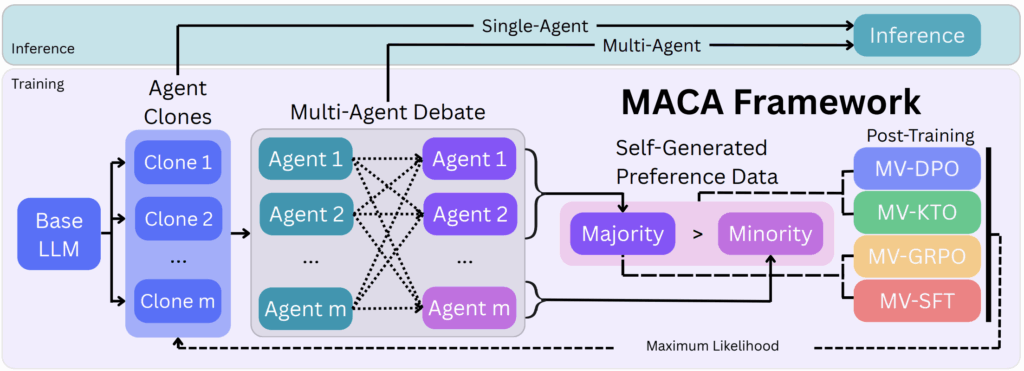
  • Internalizing Self-Consistency in LanguageModels: Multi-Agent Consensus Alignment

    Multi-Agent Consensus Alignment

    This paper addresses the evolving landscape of multi-agent reinforcement learning (MARL), focusing on the challenges and methodologies pertinent to cooperative and competitive agent interactions in complex environments. It provides a comprehensive survey of current approaches in MARL, highlighting key challenges such as non-stationarity, scalability, and communication among agents. The authors also discuss methodologies that have been proposed to overcome these challenges and point out emerging trends and future directions in this rapidly growing field.

    Introduction to Multi-Agent Reinforcement Learning

    Multi-agent reinforcement learning involves multiple autonomous agents learning to make decisions through interactions with the environment and each other. Unlike single-agent reinforcement learning, MARL systems must handle the complexity arising from interactions between agents, which can be cooperative, competitive, or mixed. The dynamic nature of other learning agents results in a non-stationary environment from each agent’s perspective, complicating the learning process. The paper stresses the importance of MARL due to its applications in robotics, autonomous driving, distributed control, and game theory.

    Major Challenges in MARL

    The paper identifies several critical challenges in MARL:

    • Non-Stationarity: Since all agents learn concurrently, the environment’s dynamics keep changing, making it hard for any single agent to stabilize its learning.
    • Scalability: The state and action spaces grow exponentially with the number of agents, posing significant computational and learning difficulties.
    • Partial Observability: Agents often have limited and local observations, which restrict their ability to fully understand the global state.
    • Credit Assignment: In cooperative settings, it is challenging to attribute overall team rewards to individual agents’ actions effectively.
    • Communication: Enabling effective and efficient communication protocols between agents is vital but non-trivial.

    Approaches and Frameworks in MARL

    The paper categorizes MARL methods primarily into three frameworks:

    1. Independent Learners: Agents learn independently using single-agent reinforcement learning algorithms while treating other agents as part of the environment. This approach is simple but often ineffective due to non-stationarity.
    2. Centralized Training with Decentralized Execution (CTDE): This popular paradigm trains agents with access to global information or shared parameters but executes policies independently based on local observations. It balances training efficiency and realistic execution constraints.
    3. Fully Centralized Approaches: These methods treat all agents as parts of one joint policy, optimizing over the combined action space. While theoretically optimal, these approaches struggle with scalability.

    Communication and Coordination Techniques

    Effective coordination and communication are imperative for MARL success. Techniques surveyed include:

    • Explicit Communication Protocols: Agents learn messages to exchange during training to improve coordination.
    • Implicit Communication: Coordination arises naturally through shared environments or value functions without explicit message passing.
    • Graph Neural Networks (GNNs): GNNs model interactions between agents, allowing flexible and scalable communication architectures suited for dynamic multi-agent systems.

    Recent Advances and Trends

    The paper highlights the integration of deep learning with MARL, enabling agents to handle high-dimensional sensory inputs and complex decision-making tasks. The use of attention mechanisms and transformer models for adaptive communication also shows promising results. Furthermore, adversarial training approaches are gaining traction in mixed cooperative-competitive environments to improve robustness and generalization.

    Applications and Use Cases

    MARL’s versatility is demonstrated in several domains:

    • Robotics: Multi-robot systems collaboratively performing tasks such as search and rescue, manipulation, and navigation.
    • Autonomous Vehicles: Coordination among autonomous cars to optimize traffic flow and safety.
    • Resource Management: Distributed control in wireless networks and energy grids.
    • Games: Complex strategic games like StarCraft II and Dota 2 serve as benchmarks for MARL algorithms.

    Open Problems and Future Directions

    The authors conclude by discussing open problems in MARL, including:

    • Scalability: Developing methods that effectively scale to large numbers of agents remains a core challenge.
    • Interpretability and Safety: Understanding learned policies and ensuring safe behaviors in real-world deployments are important.
    • Transfer Learning and Generalization: Improving agents’ ability to generalize to new tasks and environments should be prioritized.
    • Human-AI Collaboration: Integrating human knowledge and preferences with MARL systems is an emerging research frontier.

    Paper: https://arxiv.org/pdf/2509.15172

    Stay tuned for more insights into how AI is reshaping creativity and communication through multimodal learning.

  • Enhancing Individual Spatiotemporal Activity Generation with MCP-Enhanced Chain-of-Thought Large Language Models

    Enhancing Individual Spatiotemporal Activity Generation with MCP-Enhanced Chain-of-Thought Large Language Models
    Enhancing Individual Spatiotemporal Activity Generation with MCP-Enhanced Chain-of-Thought Large Language Models

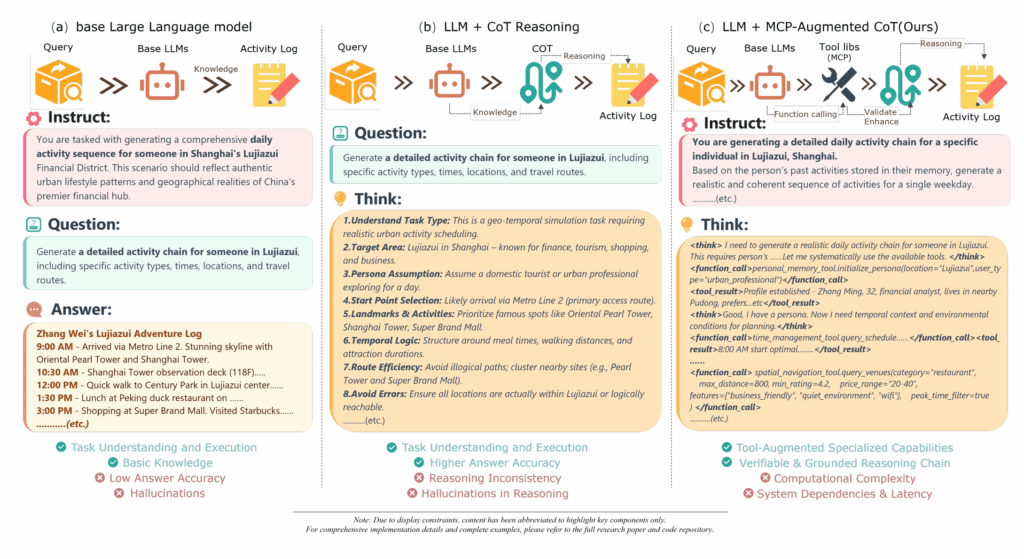
    Modeling and generating realistic human activity patterns over space and time is a crucial challenge in fields ranging from urban planning and public health to autonomous systems and social science. Traditional approaches often rely on handcrafted rules or limited datasets, which restrict their ability to capture the complexity and variability of individual behaviors.

    A recent study titled “A Study on Individual Spatiotemporal Activity Generation Method Using MCP-Enhanced Chain-of-Thought Large Language Models” proposes a novel framework that leverages the reasoning capabilities of Large Language Models (LLMs) enhanced with a Model Context Protocol (MCP) and chain-of-thought (CoT) prompting to generate detailed, realistic spatiotemporal activity sequences for individuals.

    In this blog post, we’ll explore the key ideas behind this approach, its advantages, and potential applications.

    The Challenge: Realistic Spatiotemporal Activity Generation

    Generating individual activity sequences that reflect realistic patterns in both space and time is challenging because:

    • Complex dependencies: Human activities depend on various factors such as time of day, location context, personal preferences, and social interactions.
    • Long-range correlations: Activities are not isolated; they follow routines and habits that span hours or days.
    • Data scarcity: Detailed labeled data capturing full activity trajectories is often limited or unavailable.
    • Modeling flexibility: Traditional statistical or rule-based models struggle to generalize across diverse individuals and scenarios.

    Leveraging Large Language Models with Chain-of-Thought Reasoning

    Large Language Models like GPT-4 have shown remarkable ability to perform complex reasoning when guided with chain-of-thought (CoT) prompting, which encourages the model to generate intermediate reasoning steps before producing the final output.

    However, directly applying LLMs to spatiotemporal activity generation is non-trivial because:

    • The model must handle structured spatial and temporal information.
    • It needs to maintain consistency across multiple time steps.
    • It should incorporate contextual knowledge about locations and activities.

    Introducing Model Context Protocol (MCP)

    To address these challenges, the authors propose integrating a Model Context Protocol (MCP) with CoT prompting. MCP is a structured framework that guides the LLM to:

    • Understand and maintain context: MCP encodes spatial, temporal, and personal context in a standardized format.
    • Generate stepwise reasoning: The model produces detailed intermediate steps reflecting the decision process behind activity choices.
    • Ensure consistency: By formalizing context and reasoning, MCP helps maintain coherent activity sequences over time.

    The Proposed Framework: MCP-Enhanced CoT LLMs for Activity Generation

    The framework operates as follows:

    1. Context Encoding: The individual’s current spatiotemporal state and relevant environmental information are encoded using MCP.
    2. Chain-of-Thought Prompting: The LLM is prompted to reason through activity decisions step-by-step, considering constraints and preferences.
    3. Activity Sequence Generation: The model outputs a sequence of activities with associated locations and timestamps, reflecting realistic behavior.
    4. Iterative Refinement: The process can be repeated or conditioned on previous outputs to generate longer or more complex activity patterns.

    Advantages of This Approach

    • Flexibility: The LLM can generate diverse activity sequences without requiring extensive domain-specific rules.
    • Interpretability: Chain-of-thought reasoning provides insight into the decision-making process behind activity choices.
    • Context-awareness: MCP ensures that spatial and temporal contexts are explicitly considered, improving realism.
    • Scalability: The method can be adapted to different individuals and environments by modifying context inputs.

    Experimental Validation

    The study evaluates the framework on synthetic and real-world-inspired scenarios, demonstrating that:

    • The generated activity sequences exhibit realistic temporal rhythms and spatial patterns.
    • The model successfully captures individual variability and routine behaviors.
    • MCP-enhanced CoT prompting outperforms baseline methods that lack structured context or reasoning steps.

    Potential Applications

    • Urban Planning: Simulating realistic human movement patterns to optimize transportation and infrastructure.
    • Public Health: Modeling activity patterns to study disease spread or design interventions.
    • Autonomous Systems: Enhancing prediction of human behavior for safer navigation and interaction.
    • Social Science Research: Understanding behavioral dynamics and lifestyle patterns.

    Future Directions

    The authors suggest several promising avenues for further research:

    • Integrating multimodal data (e.g., sensor readings, maps) to enrich context.
    • Extending the framework to group or crowd activity generation.
    • Combining with reinforcement learning to optimize activity sequences for specific objectives.
    • Applying to real-time activity prediction and anomaly detection.

    Conclusion

    This study showcases the power of combining Large Language Models with structured context protocols and chain-of-thought reasoning to generate detailed, realistic individual spatiotemporal activity sequences. By formalizing context and guiding reasoning, the MCP-enhanced CoT framework opens new possibilities for modeling complex human behaviors with flexibility and interpretability.

    As AI continues to advance, such innovative approaches will be key to bridging the gap between raw data and meaningful, actionable insights into human activity patterns.

    Paper: https://arxiv.org/pdf/2506.10853

    Stay tuned for more insights into how AI is transforming our understanding and simulation of human behavior in space and time.

  • Building the Web for Agents, Not Agents for the Web: A New Paradigm for AI Web Interaction

    Build the web for agents, not agents for the web
    Build the web for agents, not agents for the web

    The rise of Large Language Models (LLMs) and their multimodal counterparts has sparked a surge of interest in web agents—AI systems capable of autonomously navigating websites and completing complex tasks like booking flights, shopping, or managing emails. While this technology promises to revolutionize how we interact with the web, current approaches face fundamental challenges. Why? Because the web was designed for humans, not AI agents.

    In this blog post, we explore a visionary perspective from recent research advocating for a paradigm shift: instead of forcing AI agents to adapt to human-centric web interfaces, we should build the web specifically for agents. This new concept, called the Agentic Web Interface (AWI), aims to create safer, more efficient, and standardized environments tailored to AI capabilities.

    The Current Landscape: Web Agents Struggle with Human-Centric Interfaces

    Web agents today are designed to operate within the existing web ecosystem, which means interacting with:

    • Browser UIs: Agents process screenshots, Document Object Model (DOM) trees, or accessibility trees to understand web pages.
    • Web APIs: Some agents bypass the UI by calling APIs designed for developers rather than agents.

    Challenges Faced by Browser-Based Agents

    • Complex and Inefficient Representations:
      • Screenshots are visually rich but incomplete (hidden menus or dynamic content are missed).
      • DOM trees contain detailed page structure but are massive and noisy, often exceeding millions of tokens, making processing expensive and slow.
    • Resource Strain and Defensive Measures:
      • Automated browsing at scale can overload websites, leading to performance degradation for human users.
      • Websites respond with defenses like CAPTCHAs, which sometimes block legitimate agent use and create accessibility issues.
    • Safety and Privacy Risks:
      • Agents operating within browsers may access sensitive user data (passwords, payment info), raising concerns over misuse or accidental harm.

    Limitations of API-Based Agents

    • Narrow Action Space:
      APIs offer limited functionality compared to full UI interactions, often lacking stateful controls like sorting or filtering.
    • Developer-Centric Design:
      APIs are built for human developers, not autonomous agents, and may throttle or deny excessive requests.
    • Fallback to UI:
      When APIs cannot fulfill a task, agents must revert to interacting with the browser UI, inheriting its limitations.

    The Core Insight: The Web Is Built for Humans, Not Agents

    The fundamental problem is that web interfaces were designed for human users, with visual layouts, interactive elements, and workflows optimized for human cognition and behavior. AI agents, however, process information very differently and require interfaces that reflect their unique needs.

    Trying to force agents to operate within human-centric environments leads to inefficiency, high computational costs, and safety vulnerabilities.

    Introducing the Agentic Web Interface (AWI)

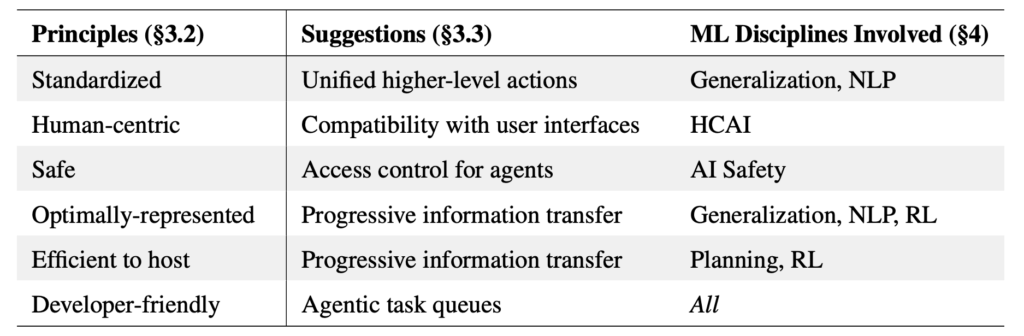
    The research proposes a bold new concept: designing web interfaces specifically for AI agents. The AWI would be a new layer or paradigm where websites expose information and controls in a way that is:

    • Efficient: Minimal and relevant information, avoiding the noise and overhead of full DOM trees or screenshots.
    • Safe: Built-in safeguards to protect user data and prevent malicious actions.
    • Standardized: Consistent formats and protocols to allow agents to generalize across different sites.
    • Transparent: Clear and auditable agent actions to build trust.
    • Expressive: Rich enough to support complex tasks and stateful interactions.
    • Collaborative: Designed with input from AI researchers, developers, and stakeholders to balance usability and security.

    Why AWI Matters: Benefits for All Stakeholders

    • For AI Agents:
      Agents can navigate and interact with websites more reliably and efficiently, reducing computational overhead and improving task success rates.
    • For Website Operators:
      Reduced server load and better control over agent behavior, minimizing the need for aggressive defenses like CAPTCHAs.
    • For Users:
      Safer interactions with AI agents that respect privacy and security, enabling trustworthy automation of web tasks.
    • For the AI Community:
      A standardized platform to innovate and build more capable, generalizable web agents.

    What Would AWI Look Like?

    While the paper does not prescribe a specific implementation, it envisions an interface that:

    • Provides structured, concise representations of page content tailored for agent consumption.
    • Supports declarative actions that agents can perform, such as clicking buttons, filling forms, or navigating pages, in a way that is unambiguous and verifiable.
    • Includes mechanisms for permissioning and auditing to ensure agents act within authorized boundaries.
    • Enables incremental updates to the interface as the page state changes, allowing agents to maintain situational awareness without reprocessing entire pages.

    The Road Ahead: Collaborative Effort Needed

    Designing and deploying AWIs will require:

    • Interdisciplinary collaboration: Web developers, AI researchers, security experts, and regulators must work together.
    • Community standards: Similar to how HTML and HTTP standardized web content and communication, AWI standards must emerge to enable broad adoption.
    • Iterative design and evaluation: Prototypes and experiments will be essential to balance agent needs with user safety and privacy.

    Conclusion: Building the Web for the Future of AI Agents

    The vision of the Agentic Web Interface challenges the status quo by asking us to rethink how web interactions are designed—not just for humans, but for intelligent agents that will increasingly automate our digital lives.

    By building the web for agents, we can unlock safer, more efficient, and more powerful AI-driven automation, benefiting users, developers, and the broader AI ecosystem.

    This paradigm shift calls for collective action from the machine learning community and beyond to create the next generation of web interfaces—ones that truly empower AI agents to thrive.

    Paper: https://arxiv.org/pdf/2506.10953

    If you’re interested in the future of AI and web interaction, stay tuned for more insights as researchers and developers explore this exciting frontier.