Category: Agentic and Autonomous Systems

This category is about Agentic and Autonomous Systems

  • Intelligent System of Emergent Knowledge (ISEK): A Coordination Fabric for Billions of Minds

    Intelligent System of Emergent Knowledge (ISEK): A Coordination Fabric for Billions of Minds
    Intelligent System of Emergent Knowledge (ISEK): A Coordination Fabric for Billions of Minds

    The rapid evolution of artificial intelligence and decentralized technologies has opened new horizons for large-scale collaboration between human and AI agents. The paper “Intelligent System of Emergent Knowledge (ISEK): A Coordination Fabric for Billions of Minds” (arXiv:2506.09335) introduces a visionary framework that enables billions of autonomous agents—both human and artificial—to collaborate in a decentralized, censorship-resistant, and adaptive ecosystem. This article summarizes the key ideas, architecture, and implications of ISEK, highlighting how it lays the groundwork for a global, emergent collective intelligence.

    1. Vision and Motivation

    1.1 The Challenge of Centralized Intelligence

    • Traditional AI and digital infrastructures rely on centralized systems prone to censorship, single points of failure, and control bottlenecks.
    • Current agent-based systems are limited by rigid workflows and centralized orchestration, restricting autonomous collaboration at scale.
    • There is a need for a decentralized, resilient, and adaptive infrastructure that supports billions of agents acting as peers.

    1.2 ISEK’s Vision

    • A Decentralized Cognitive Ecosystem: ISEK envisions a global network where humans and AI agents interact as equals, forming a self-organizing, emergent intelligence.
    • Symbiotic Collaboration: AI amplifies human cognitive capabilities, while humans provide ethical guidance, creativity, and domain knowledge.
    • Self-Directed Evolution: The system continuously adapts and improves through distributed consensus and feedback loops, becoming stronger in the face of disruption.

    2. Core Principles of ISEK

    ISEK is built on three foundational pillars:

    2.1 Decentralized Multi-Agent Architecture

    • Utilizes blockchain and Web3 technologies to create a censorship-resistant, trustless network.
    • No central authority controls the system; all agents operate autonomously but cooperatively.
    • Guarantees persistence, autonomy, and secure cooperation among heterogeneous agents.

    2.2 AI–Human Symbiosis and Equality

    • Every agent—human or AI—has verifiable identity and equal participation rights.
    • The architecture fosters mutual augmentation: AI automates and optimizes tasks, humans provide values and creativity.
    • Promotes inclusive participation in building collective intelligence.

    2.3 Resilience and Self-Evolving Intelligence

    • Designed to withstand failures, attacks, and environmental changes using distributed consensus and redundancy.
    • The system learns and evolves from adversity, continuously optimizing coordination and agent behavior.
    • Self-healing and self-improving without centralized intervention.

    3. Rethinking Infrastructure for an Agent-Native World

    3.1 From Static Platforms to Dynamic Coordination

    • Traditional infrastructure routes data but does not route goals or intentions.
    • ISEK enables agents to discover and collaborate dynamically based on relevance, capabilities, and incentives.
    • Trust, memory, and reputation are intrinsic network properties, not add-ons.

    3.2 Emergent Coordination

    • Coordination arises organically through agent interactions rather than predefined workflows.
    • Agents advertise their identities, skills, and intentions transparently.
    • The network self-routes tasks and aligns agents toward shared or emergent objectives.

    4. Designed for Billions of Minds

    4.1 Universal Agent Sovereignty

    • Each agent is persistent, sovereign, and composable.
    • Agents operate seamlessly across platforms, protocols, and jurisdictions.
    • Communication and collaboration happen via shared, open protocols ensuring interoperability.

    4.2 Non-Hierarchical Network Architecture

    • No privileged nodes; every node can restore the network’s function.
    • Supports global-scale agent-to-agent communication, discovery, coordination, and value exchange.
    • Enables a truly decentralized ecosystem of autonomous intelligence.

    4.3 Beyond Products and Services

    • ISEK is not a commercial product or cloud service.
    • It is a substrate for collective cognition—an infrastructure where intelligence emerges, evolves, and persists.

    5. Technical Architecture Overview

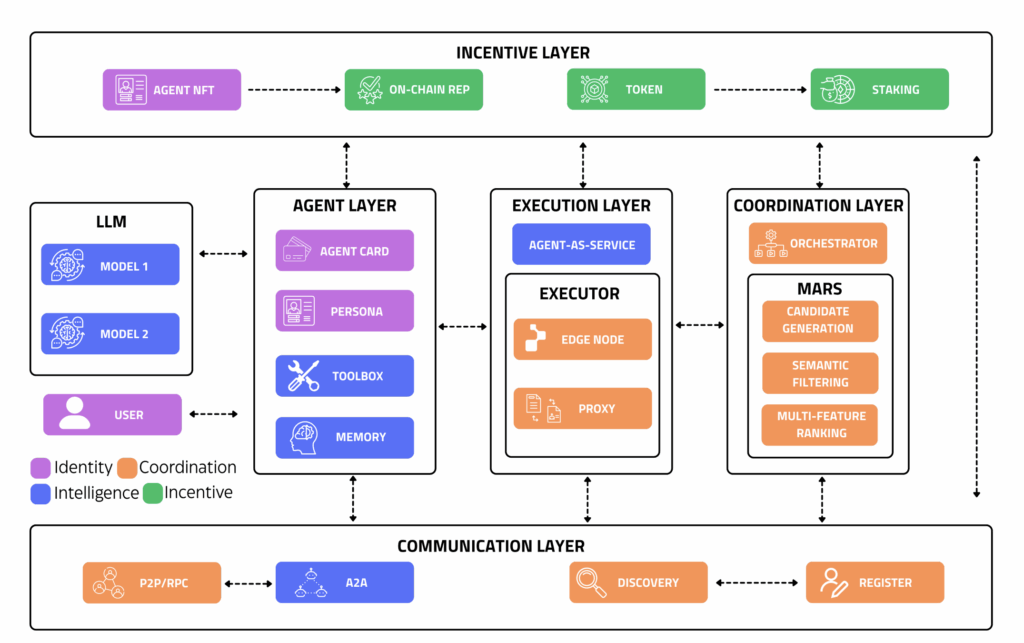
    ISEK’s architecture consists of five interconnected layers enabling a closed-loop system for task execution and value circulation.

    5.1 Agent Model Layer

    • Persona: Defines agent behavior, language, and motivation.
    • Toolbox: Modular capabilities such as AI models, web tools, and scripts.
    • Memory: Lightweight long-term memory supporting vector databases for context and personalization.
    • Agent Card: Metadata including unique ID, capabilities, reputation, and latency.

    5.2 Communication Protocol Layer

    • Peer-to-peer (P2P) protocol based on simplified JSON-RPC.
    • Agents broadcast their Agent Cards for decentralized registration and discovery.
    • Supports multi-turn dialog for complex task execution and recovery.
    • Task requests propagate via probabilistic gossip, enabling scalable dissemination.

    5.3 Task Scheduling and Coordination Layer

    • MARS (Modular Agent Recruitment System): Decentralized mechanism for matching tasks with suitable agents.
    • Combines gossip propagation, trust updates, semantic matching, and multi-stage ranking.
    • Uses attribute-based encryption to ensure only authorized agents access task data.
    • Three-stage filtering process:
      • Candidate generation via vector similarity search.
      • LLM-based semantic filtering for capability alignment.
      • Multi-feature ranking incorporating reputation, latency, availability, and history.

    5.4 Orchestration and Monitoring

    • Orchestrator agents manage expert agents and system state.
    • Auto-deployment and scaling based on resource utilization and task queue status.
    • Kubernetes and Prometheus used for monitoring and control.

    5.5 Economic and Incentive Layer

    • Native $ISEK token facilitates micropayments, governance participation, and reputation tracking.
    • NFT-based identity management ensures agent sovereignty.
    • Incentive engineering aligns agent behavior with system goals.

    6. Implications and Future Directions

    6.1 Paradigm Shift in Intelligence Infrastructure

    • Moves from centralized AI platforms to decentralized, agent-native ecosystems.
    • Enables emergent intelligence that is adaptive, resilient, and inclusive.

    6.2 Empowering Human-AI Co-evolution

    • Supports a digital commons where AI and humans co-create knowledge and solutions.
    • Promotes ethical grounding and creativity alongside automation.

    6.3 Challenges and Opportunities

    • Scaling to billions of agents requires robust coordination and trust mechanisms.
    • Continuous expansion and evolution of agent capabilities and protocols.
    • Potential to transform governance, scientific discovery, and digital collaboration.

    7. Summary

    AspectDescription
    DecentralizationCensorship-resistant, trustless multi-agent network built on blockchain/Web3.
    Symbiotic CollaborationEqual participation and mutual augmentation of human and AI agents.
    Self-Evolving IntelligenceResilient, adaptive system that learns and improves through distributed consensus.
    Dynamic CoordinationSix-phase workflow (Publish → Discover → Recruit → Execute → Settle → Feedback) for task flow.
    Scalable RecruitmentMARS system for efficient, trustworthy agent-task matching at massive scale.
    Economic Incentives$ISEK token and NFT identity for micropayments, governance, and reputation management.

    Conclusion

    The Intelligent System of Emergent Knowledge (ISEK) represents a transformative step toward a decentralized, agent-native future where billions of human and AI minds collaborate as peers. By combining blockchain infrastructure, advanced AI, and incentive engineering, ISEK creates a resilient, adaptive cognitive fabric that enables emergent intelligence beyond centralized constraints. This framework lays the foundation for a new era of collective cognition, empowering humanity and machines to co-evolve in a shared digital commons.

    For more information and updates, visit the ISEK Foundation website or contact the authors at team@isek.xyz.

    Paper: https://arxiv.org/pdf/2506.09335

  • AUTOMIND: An Adaptive Knowledgeable Agent for Automated Data Science

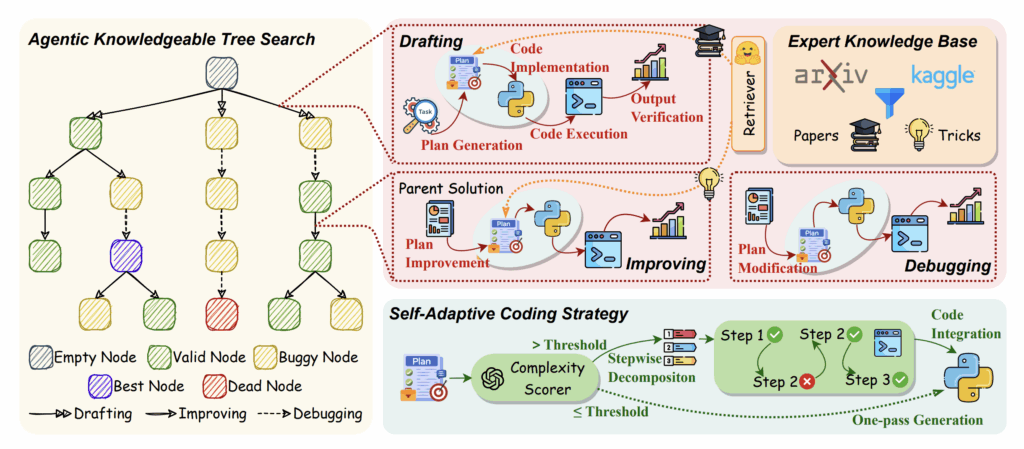
    Automated data science aims to leverage AI agents, especially those powered by Large Language Models (LLMs), to autonomously perform complex machine learning tasks. While LLM-driven agents have shown promise in automating parts of the machine learning pipeline, their real-world effectiveness is often limited. This article summarizes the key contributions of the paper “AUTOMIND: Adaptive Knowledgeable Agent for Automated Data Science” (arXiv:2506.10974), which proposes a novel framework to overcome these limitations and significantly improve automated data science performance.

    1. Background and Motivation

    Automated data science agents seek to automate the entire machine learning workflow, including:

    • Task comprehension
    • Data exploration and analysis
    • Feature engineering
    • Model selection, training, and evaluation

    Despite progress, existing agents tend to rely on rigid, pre-defined workflows and inflexible coding strategies. This restricts their ability to handle complex, innovative tasks that require empirical expertise and creative problem solving—skills human practitioners naturally bring.

    Challenges with Current Approaches

    • Rigid workflows: Predefined pipelines limit flexibility.
    • Inflexible coding: Static code generation works only for simple, classical problems.
    • Lack of empirical expertise: Agents miss out on domain-specific knowledge and practical tricks.
    • Limited adaptability: Difficulty addressing novel or complex data science challenges.

    2. Introducing AUTOMIND

    AUTOMIND is an adaptive, knowledgeable LLM-agent framework designed to tackle these challenges by incorporating three key innovations:

    2.1 Expert Knowledge Base

    • Curated from top-ranked competition solutions and recent academic papers.
    • Contains domain-specific tricks, strategies, and insights.
    • Enables the agent to ground its problem-solving in expert knowledge rather than relying solely on pre-trained model weights.

    2.2 Agentic Knowledgeable Tree Search

    • Models the solution space as a tree of candidate solutions.
    • Iteratively explores, drafts, improves, and debugs solutions.
    • Selects promising solution nodes based on validation metrics and search policies.
    • Balances exploration and exploitation to find optimal solutions efficiently.

    2.3 Self-Adaptive Coding Strategy

    • Dynamically adjusts code generation complexity based on task difficulty.
    • Employs one-pass generation for simple tasks and stepwise decomposition for complex ones.
    • Improves code quality and robustness tailored to the problem context.

    3. How AUTOMIND Works

    3.1 Knowledge Retrieval

    • Uses a hierarchical labeling system to categorize knowledge in the expert base.
    • Retrieves relevant papers and tricks based on task labels.
    • Filters and re-ranks retrieved knowledge to avoid plagiarism and prioritize high-quality insights.

    3.2 Solution Tree Search

    • Each node in the tree represents a candidate solution: a plan, corresponding code, and validation metric.
    • The agent selects nodes to draft new solutions, debug buggy ones, or improve valid solutions.
    • Search policies govern decisions to balance innovation and refinement.

    3.3 Adaptive Code Generation

    • Complexity scorer evaluates the difficulty of the current solution.
    • If complexity is below a threshold, generates code in one pass.
    • For higher complexity, decomposes the task into smaller steps and generates code incrementally.
    • This flexibility enhances code correctness and adaptability.

    4. Experimental Evaluation

    AUTOMIND was evaluated on two automated data science benchmarks using different foundation models. Key results include:

    • Superior performance: Outperforms state-of-the-art baselines by a significant margin.
    • Human-level achievement: Surpasses 56.8% of human participants on the MLE-Bench leaderboard.
    • Efficiency gains: Achieves 300% higher efficiency and reduces token usage by 63% compared to prior methods.
    • Qualitative improvements: Produces higher-quality, more robust solutions.

    These results demonstrate AUTOMIND’s effectiveness in handling complex, real-world data science tasks.

    5. Significance and Contributions

    5.1 Bridging Human Expertise and AI

    • By integrating a curated expert knowledge base, AUTOMIND mimics the empirical insights human data scientists use.
    • This bridges the gap between static LLM knowledge and dynamic, domain-specific expertise.

    5.2 Flexible and Strategic Problem Solving

    • The agentic tree search enables strategic exploration of solution space rather than following rigid workflows.
    • This flexibility allows tackling novel and complex problems more effectively.

    5.3 Adaptive Code Generation

    • Tailoring code generation to task complexity reduces errors and improves solution quality.
    • This dynamic approach contrasts with one-size-fits-all coding strategies in prior work.

    6. Future Directions and Limitations

    While AUTOMIND represents a significant advance, the paper notes areas for future work:

    • Broader task domains: Extending beyond data science to other scientific discovery challenges.
    • Knowledge base expansion: Continuously updating with new research and competition insights.
    • Multi-agent collaboration: Exploring interactions among multiple specialized agents.
    • Robustness and generalization: Further improving adaptability to unseen tasks and noisy data.

    7. Summary

    FeatureDescription
    Expert Knowledge BaseCurated domain-specific tricks and papers to ground agent knowledge.
    Agentic Tree SearchIterative exploration and refinement of candidate solutions modeled as a search tree.
    Self-Adaptive CodingDynamic code generation strategy tailored to task complexity.
    PerformanceOutperforms state-of-the-art baselines and surpasses many human competitors.
    EfficiencyAchieves significant improvements in computational efficiency and token usage.

    Conclusion

    AUTOMIND introduces a novel, adaptive framework that combines expert knowledge, strategic search, and flexible coding to push the boundaries of automated data science. By addressing the limitations of previous rigid and inflexible approaches, it delivers superior performance and efficiency on challenging benchmarks. This work marks a promising step toward fully autonomous AI agents capable of tackling complex, real-world scientific and data-driven problems.

    For more details and code, visit the AUTOMIND GitHub repository: https://github.com/innovatingAI/AutoMind

    Paper: https://arxiv.org/pdf/2506.10974

  • In-Depth Summary: Scaling Laws for Language Model Training

    Scaling Laws for Language Model Training: A Comprehensive Study
    Scaling Laws for Language Model Training: A Comprehensive Study

    1. Introduction and Motivation

    The paper addresses a fundamental question in AI: How should we allocate resources—model size, data, and compute—to train the most effective language models? By investigating the relationships between these factors, the authors aim to provide a practical guide for future model development.

    Key Points:

    • Scaling laws are empirical relationships that predict how model performance improves as resources increase.
    • Understanding these laws helps avoid inefficient training (e.g., making a model too large for the available data).
    • The study seeks to unify previous findings and extend them with new, comprehensive experiments.

    2. Core Concepts and Definitions

    To interpret the results, it’s important to understand the main variables:

    • Model Size (N): Number of trainable parameters in the neural network.
    • Dataset Size (D): Total number of tokens (words or subwords) in the training data.
    • Compute Budget (C): Total computational effort, often measured in floating-point operations (FLOPs).
    • Loss (L): Cross-entropy loss on validation data, indicating how well the model predicts unseen text.

    Relationships Explored:

    • How does increasing N, D, or C affect L?
    • What’s the optimal way to balance these variables for best performance?

    3. Experimental Setup

    The authors designed a rigorous set of experiments:

    • Model Architecture: Variants of the transformer model, scaled from small to very large.
    • Training Data: Large, diverse text datasets to ensure generalizable results.
    • Compute Range: From modest compute budgets (suitable for academic labs) to massive budgets (on par with industry-scale training).
    • Evaluation: Consistent use of cross-entropy loss on a held-out validation set for fair comparison.

    Why This Matters:
    By systematically varying each factor, the study isolates the effects of model size, data, and compute, enabling robust conclusions.

    4. Main Results: Detailed Scaling Laws

    4.1. Loss vs. Model Size

    • Finding: For a fixed dataset and compute, increasing model size reduces loss, following a power-law trend.
    • Implication: Larger models are better—but the benefit shrinks as size increases (diminishing returns).

    4.2. Loss vs. Dataset Size

    • Finding: For a fixed model size, increasing the amount of training data also reduces loss, again following a power-law.
    • Implication: More data is always helpful, but only up to a point—eventually, the model can’t make full use of extra data.

    4.3. Compute-Optimal Allocation

    • Key Formula: The paper derives mathematical expressions showing how to split your compute budget between making the model bigger and training it longer (on more data).
    • Optimal Point: For any given compute budget, there’s a “sweet spot” where model size and dataset size are balanced for the best performance.

    4.4. Unified Scaling Law

    • Unified Model: The authors combine the above findings into a single law that predicts loss as a function of model size, data size, and compute.
    • Accuracy: This unified law fits experimental data across a wide range of scales, making it a powerful tool for planning future training runs.

    5. Practical Implications

    For Researchers and Engineers

    • Planning: Use scaling laws to estimate how much data and compute you’ll need for a target performance.
    • Efficiency: Avoid waste—don’t train a huge model on a tiny dataset, or vice versa.
    • Benchmarking: Compare new models or training strategies against the expected scaling curve.

    For the AI Community

    • Transparency: Scaling laws provide a common language for discussing model improvements.
    • Progress: As models and datasets grow, scaling laws help track whether new methods are genuinely better or just bigger.

    6. Limitations and Open Questions

    • Architectural Scope: The study focuses on transformers; other architectures may scale differently.
    • Data Quality: Assumes high-quality, diverse data; results may vary with noisy or domain-specific datasets.
    • Task Specificity: Results are for language modeling; scaling for other tasks (e.g., reasoning, vision) may differ.
    • Frontiers: How do scaling laws change for multimodal models (text + images) or for specialized domains?

    7. Key Takeaways

    • Performance improves predictably with more data, bigger models, and greater compute, but with diminishing returns.
    • There’s an optimal allocation of resources for any compute budget—don’t just make models bigger; balance with data.
    • Scaling laws are powerful tools for guiding AI research, benchmarking progress, and planning resource use.

    Conclusion

    This comprehensive study of scaling laws provides a roadmap for building and training future language models. By quantifying the trade-offs between model size, data, and compute, the paper empowers both researchers and practitioners to make informed, efficient decisions. As the field evolves, these insights will be crucial for pushing the boundaries of what language models can achieve.

    Stay tuned for future posts where we’ll break down more cutting-edge papers and explore how these principles are shaping the next generation of AI!

  • Understanding the Scaling Laws for Language Model Training: A Comprehensive Overview

    Future of Work with AI Agents
    Future of Work with AI Agents

    The rapid advancement of language models has been a defining feature of artificial intelligence research in recent years. The paper “Scaling Laws for Language Model Training: A Comprehensive Study” (arXiv:2506.06576) presents an in-depth analysis of how various factors—such as model size, dataset size, and compute resources—affect the performance of language models. This study provides valuable insights and practical guidelines for training efficient and powerful language models.

    In this article, we summarize the key findings and methodologies from the paper, highlighting the core concepts, experimental design, and implications for AI research and development.

    1. Introduction to Scaling Laws in Language Models

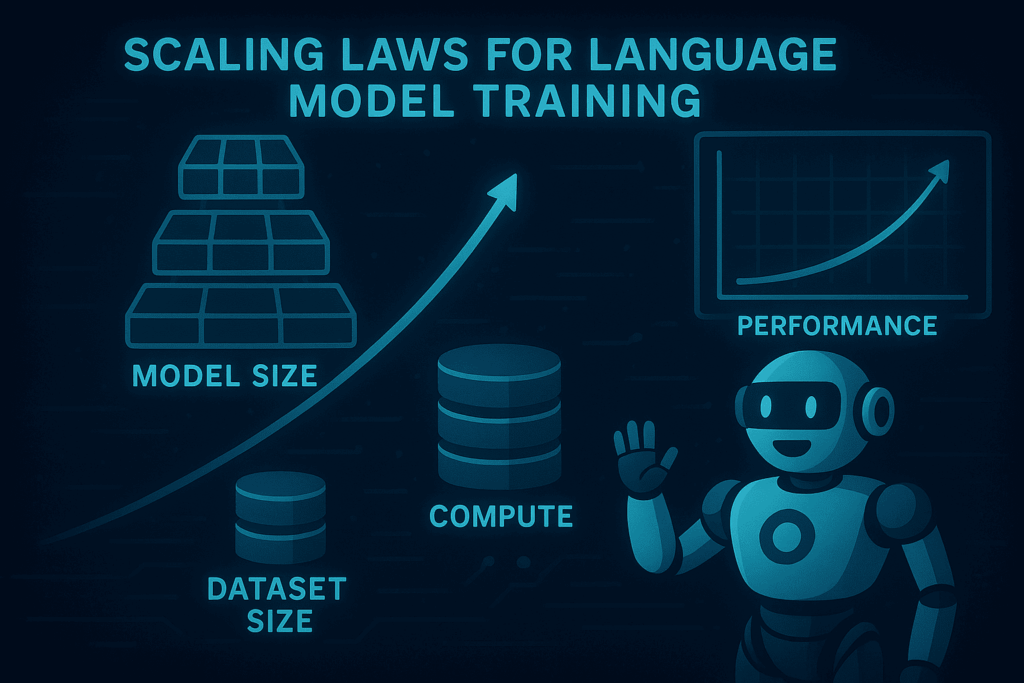
    Scaling laws describe predictable relationships between the size of a model, the amount of training data, the compute budget, and the resulting model performance. Understanding these laws helps researchers and engineers optimize resource allocation and improve language model capabilities.

    • Purpose of the study: To systematically investigate how language model performance scales with different training parameters.
    • Motivation: Previous work showed that larger models trained on more data tend to perform better, but a comprehensive, unified framework was lacking.
    • Goal: Provide a detailed empirical foundation for scaling laws that can guide future model development.

    2. Key Concepts and Definitions

    Before diving into the experiments, the paper defines several important concepts:

    • Model size (N): The number of trainable parameters in the neural network.
    • Dataset size (D): The number of tokens used for training.
    • Compute budget (C): The total amount of computational resources, often measured in floating-point operations (FLOPs).
    • Loss (L): The cross-entropy loss on a held-out validation set, which measures how well the model predicts unseen data.

    The relationship between these variables forms the basis of the scaling laws.

    3. Experimental Setup and Methodology

    The authors conducted extensive experiments training transformer-based language models across a wide range of scales.

    • Model architecture: Standard transformer models with varying depths and widths.
    • Training data: Large-scale text corpora encompassing diverse sources.
    • Compute range: From small-scale experiments to models requiring hundreds of petaflops.
    • Evaluation: Performance measured by cross-entropy loss on a fixed validation set.

    This broad experimental design allows for robust conclusions about how scaling impacts performance.

    4. Main Findings: The Scaling Laws

    The study identifies several key scaling relationships:

    4.1 Power-law Relationship Between Loss and Model Size

    • Loss decreases as a power-law function of model size when dataset size and compute are fixed.
    • Larger models consistently achieve lower loss, but with diminishing returns as size increases.

    4.2 Dataset Size and Optimal Training

    • For a fixed model size, increasing dataset size reduces loss following a power-law.
    • There is an optimal balance between model size and dataset size for a given compute budget.

    4.3 Compute-Optimal Training

    • The study derives formulas to allocate compute efficiently between increasing model size and training duration.
    • Training a model too large on too little data or too small on too much data leads to suboptimal performance.

    4.4 Joint Scaling Laws

    • The authors propose a unified scaling law that relates loss to model size, dataset size, and compute budget simultaneously.
    • This law accurately predicts performance across a wide range of training regimes.

    5. Practical Implications for AI Development

    The findings offer actionable guidance for researchers and practitioners:

    • Resource allocation: Helps decide how to split compute resources between model size and training steps.
    • Model design: Encourages designing models that fit the available data and compute to maximize efficiency.
    • Training strategies: Suggests avoiding undertraining or overtraining by following the optimal scaling curves.
    • Benchmarking: Provides a baseline to evaluate new architectures and training methods against expected performance.

    6. Limitations and Future Directions

    While the study is comprehensive, the authors acknowledge several limitations:

    • Model architecture: Focused primarily on transformer models; results may differ for other architectures.
    • Data quality: Assumes large, high-quality datasets; scaling laws might vary with noisier data.
    • Task specificity: The study centers on language modeling loss; other tasks may exhibit different scaling behaviors.

    Future research could explore:

    • Extending scaling laws to multimodal models combining text, images, and other data.
    • Investigating the impact of architectural innovations on scaling efficiency.
    • Applying scaling principles to domain-specific or low-resource languages.

    7. Summary: Key Takeaways

    • Language model performance improves predictably with increased model size, dataset size, and compute, following power-law scaling.
    • There is an optimal trade-off between model size and dataset size for a given compute budget.
    • Unified scaling laws enable precise estimation of model performance and efficient resource use.
    • These insights provide a roadmap for building more powerful and efficient language models.

    Conclusion

    The paper “Scaling Laws for Language Model Training: A Comprehensive Study” offers a foundational framework for understanding how language models grow in capability with scale. By quantifying the relationships between model size, data, and compute, it empowers researchers to make informed decisions in developing the next generation of AI systems. As language models continue to evolve, these scaling laws will remain a critical tool for navigating the complex landscape of AI research.

    Stay tuned to this blog for more summaries and insights from cutting-edge AI research papers!