Blog AI Frontiers

  • Enhancing Large Language Models with Retrieval-Augmented Generation: A Comprehensive Overview

    Enhancing Large Language Models with Retrieval-Augmented Generation
    Enhancing Large Language Models with Retrieval-Augmented Generation

    Large Language Models (LLMs) have revolutionized natural language processing by generating fluent and contextually relevant text. However, their ability to provide accurate, up-to-date, and factually grounded information remains limited by the static nature of their training data. The paper “Retrieval-Augmented Generation for Knowledge-Intensive NLP Tasks” (arXiv:2506.10975) proposes an innovative framework that combines LLMs with external knowledge retrieval systems to overcome these limitations. This article summarizes the key ideas, methodology, and implications of this approach, highlighting how it advances the state of the art in knowledge-intensive natural language processing.

    1. Motivation and Background

    • Limitations of LLMs: Despite their impressive language understanding and generation capabilities, LLMs struggle with tasks requiring up-to-date knowledge or specialized domain information not fully captured during pretraining.
    • Static Knowledge: LLMs rely on fixed training data and do not dynamically incorporate new information, which can lead to outdated or incorrect responses.
    • Need for Retrieval: Integrating external retrieval mechanisms enables models to access relevant documents or facts at inference time, improving accuracy and factuality.

    2. Retrieval-Augmented Generation (RAG) Framework

    The core idea behind RAG is to augment LLMs with a retrieval module that fetches relevant knowledge from large external corpora before generating answers.

    2.1 Architecture Components

    • Retriever: Efficiently searches a large document collection to identify passages relevant to the input query.
    • Generator: A pretrained language model that conditions its output on both the query and retrieved documents.
    • End-to-End Training: The retriever and generator are jointly trained to optimize final task performance.

    2.2 Workflow

    1. Query Input: The user provides a question or prompt.
    2. Document Retrieval: The retriever searches indexed documents and returns top-k relevant passages.
    3. Answer Generation: The generator produces a response conditioned on the retrieved passages and the input query.
    4. Output: The final generated text is more accurate and grounded in external knowledge.

    3. Advantages of RAG

    • Improved Accuracy: By accessing relevant documents, RAG models generate more factually correct and contextually appropriate answers.
    • Dynamic Knowledge: The system can incorporate new information by updating the document corpus without retraining the entire model.
    • Scalability: Retrieval allows the model to handle vast knowledge bases beyond the fixed parameters of the LLM.
    • Interpretability: Retrieved documents provide evidence supporting the generated answers, enhancing transparency.

    4. Experimental Evaluation

    The paper evaluates RAG on multiple knowledge-intensive NLP tasks, including open-domain question answering and fact verification.

    4.1 Benchmarks and Datasets

    • Natural Questions (NQ): Real-world questions requiring retrieval of factual information.
    • TriviaQA: Trivia questions with diverse topics.
    • FEVER: Fact verification dataset where claims must be checked against evidence.

    4.2 Results

    • RAG models outperform baseline LLMs without retrieval by significant margins on all tasks.
    • Joint training of retriever and generator yields better retrieval relevance and generation quality.
    • Ablation studies show that both components are critical for optimal performance.

    5. Technical Innovations

    • Differentiable Retrieval: Enables backpropagation through the retrieval step, allowing end-to-end optimization.
    • Fusion-in-Decoder: The generator integrates multiple retrieved passages effectively to produce coherent responses.
    • Efficient Indexing: Uses dense vector representations and approximate nearest neighbor search for scalable retrieval.

    6. Practical Implications

    • Updatable Knowledge Bases: Organizations can maintain fresh corpora to keep AI systems current.
    • Domain Adaptation: RAG can be tailored to specialized fields by indexing domain-specific documents.
    • Reduced Hallucination: Grounding generation in retrieved evidence mitigates fabrications common in pure LLM outputs.
    • Explainability: Providing source documents alongside answers helps users verify information.

    7. Limitations and Future Directions

    • Retriever Dependence: Quality of generated answers heavily depends on retrieval accuracy.
    • Latency: Retrieval adds computational overhead, potentially affecting response time.
    • Corpus Coverage: Missing or incomplete documents limit the system’s knowledge.
    • Integration with Larger Models: Scaling RAG with very large LLMs remains an ongoing challenge.

    Future research aims to improve retrieval efficiency, expand corpora coverage, and enhance integration with multimodal knowledge sources.

    8. Summary

    AspectDescription
    Core IdeaCombine LLMs with external retrieval to ground generation in relevant documents.
    ArchitectureRetriever fetches documents; generator produces answers conditioned on retrieved knowledge.
    BenefitsImproved accuracy, dynamic knowledge updating, better interpretability, and scalability.
    EvaluationOutperforms baselines on open-domain QA and fact verification benchmarks.
    ChallengesRetrieval quality, latency, corpus completeness, and scaling integration with large models.

    Conclusion

    Retrieval-Augmented Generation represents a significant advancement in building knowledge-aware language models. By bridging the gap between static pretrained knowledge and dynamic information retrieval, RAG systems deliver more accurate, up-to-date, and interpretable responses. This framework opens new opportunities for deploying AI in knowledge-intensive applications across domains, from customer support to scientific research. Continued innovation in retrieval methods and integration strategies promises to further enhance the capabilities of next-generation language models.

    For more details, refer to the original paper: arXiv:2506.10975.

  • Unlocking Dynamic Scene Understanding: Neural Radiance Fields for Deformable Objects

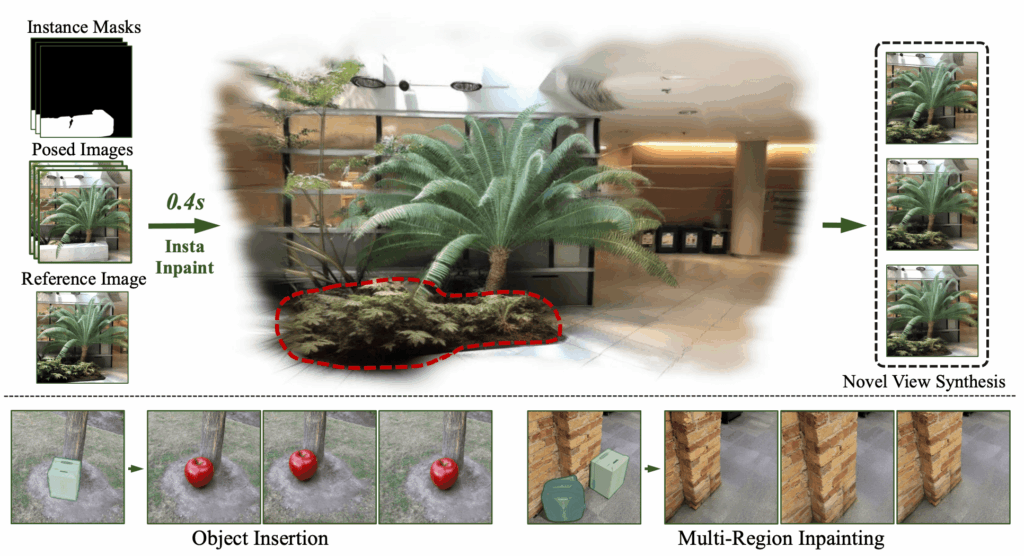
    InstaInpaint: Instant 3D-Scene Inpainting with
Masked Large Reconstruction Model
    InstaInpaint: Instant 3D-Scene Inpainting with Masked Large Reconstruction Model

    The world around us is in constant motion — people walk, animals move, objects deform. Capturing and understanding such dynamic scenes in 3D has long been a challenge in computer vision and graphics. Recently, Neural Radiance Fields (NeRF) revolutionized static 3D scene reconstruction and novel view synthesis, but handling dynamic, deformable objects remains a tough nut to crack.

    A new research paper titled “Neural Radiance Fields for Dynamic Scenes with Deformable Objects” (arXiv:2506.10980) proposes an innovative approach to extend NeRF’s capabilities to dynamic environments. This blog post breaks down the core ideas, methods, and potential applications of this exciting development.

    What Are Neural Radiance Fields (NeRF)?

    Before diving into the dynamic extension, let’s quickly recap what NeRF is:

    • NeRF is a deep learning framework that represents a 3D scene as a continuous volumetric radiance field.
    • Given a set of images from different viewpoints, NeRF learns to predict color and density at any 3D point, enabling photorealistic rendering of novel views.
    • It excels at static scenes but struggles with dynamic content due to its assumption of a fixed scene.

    The Challenge: Dynamic Scenes with Deformable Objects

    Real-world scenes often contain moving and deforming objects — think of a dancing person or a waving flag. Modeling such scenes requires:

    • Capturing time-varying geometry and appearance.
    • Handling non-rigid deformations, where objects change shape over time.
    • Maintaining high-quality rendering from arbitrary viewpoints at any time frame.

    Traditional NeRF methods fall short because they assume static geometry and appearance.

    The Proposed Solution: Dynamic NeRF for Deformable Objects

    The authors propose a novel framework that extends NeRF to handle dynamic scenes with deformable objects by combining:

    1. Deformation Fields:
      They introduce a learnable deformation field that maps points in the dynamic scene at any time to a canonical (reference) space. This canonical space represents the object in a neutral, undeformed state.
    2. Canonical Radiance Field:
      Instead of modeling the scene directly at each time step, the system learns a canonical radiance field representing the object’s appearance and geometry in the canonical space.
    3. Time-Dependent Warping:
      For each timestamp, the model predicts how points move from the canonical space to their deformed positions in the dynamic scene, enabling it to reconstruct the scene at any moment.

    How Does It Work?

    The approach can be summarized in three main steps:

    1. Learning the Canonical Space

    • The model first learns a canonical 3D representation of the object or scene in a neutral pose.
    • This representation encodes the geometry and appearance without deformation.

    2. Modeling Deformations Over Time

    • A deformation network predicts how each point in the canonical space moves to its position at any given time.
    • This captures complex non-rigid motions like bending, stretching, or twisting.

    3. Rendering Novel Views Dynamically

    • Given a camera viewpoint and time, the model:
      • Maps the query 3D points from the dynamic space back to the canonical space using the inverse deformation.
      • Queries the canonical radiance field to get color and density.
      • Uses volume rendering to synthesize the final image.

    This pipeline enables rendering photorealistic images of the scene from new viewpoints and times, effectively animating the deformable object.

    Key Innovations and Advantages

    • Unified Representation: The canonical space plus deformation fields provide a compact and flexible way to model dynamic scenes without needing explicit mesh tracking or complex rigging.
    • Generalization: The model can handle a wide variety of deformations, making it applicable to humans, animals, and other non-rigid objects.
    • High Fidelity: By building on NeRF’s volumetric rendering, the approach produces detailed and realistic images.
    • Temporal Coherence: The deformation fields ensure smooth transitions over time, avoiding flickering or artifacts common in dynamic scene reconstruction.

    Potential Applications

    This breakthrough opens doors to numerous exciting applications:

    • Virtual Reality and Gaming: Realistic dynamic avatars and environments that respond naturally to user interaction.
    • Film and Animation: Easier capture and rendering of complex deforming characters without manual rigging.
    • Robotics and Autonomous Systems: Better understanding of dynamic environments for navigation and interaction.
    • Medical Imaging: Modeling deformable anatomical structures over time, such as heartbeats or breathing.
    • Sports Analysis: Reconstructing athletes’ movements in 3D for training and performance evaluation.

    Challenges and Future Directions

    While promising, the method faces some limitations:

    • Computational Cost: Training and rendering can be resource-intensive, limiting real-time applications.
    • Data Requirements: High-quality multi-view video data is needed for training, which may not always be available.
    • Complex Scenes: Handling multiple interacting deformable objects or large-scale scenes remains challenging.

    Future research may focus on:

    • Improving efficiency for real-time dynamic scene rendering.
    • Extending to multi-object and multi-person scenarios.
    • Combining with semantic understanding for richer scene interpretation.

    Summary: A Leap Forward in Dynamic 3D Scene Modeling

    The work on Neural Radiance Fields for dynamic scenes with deformable objects represents a significant leap in 3D vision and graphics. By elegantly combining canonical radiance fields with learnable deformation mappings, this approach overcomes the static limitations of traditional NeRFs and unlocks the potential to capture and render complex, non-rigid motions with high realism.

    For AI enthusiasts, computer vision researchers, and developers working on immersive technologies, this research offers a powerful tool to bring dynamic 3D worlds to life.

    If you’re interested in exploring the technical details, the full paper is available on arXiv: https://arxiv.org/pdf/2506.10980.pdf.

    Feel free to reach out if you’d like a deeper dive into the methodology or potential integrations with your projects!

  • SceneCompleter: Advancing 3D Scene Completion for Novel View Synthesis

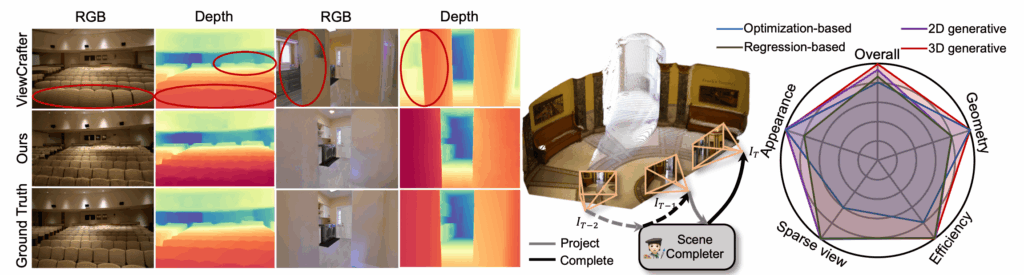
    SceneCompleter: Dense 3D Scene Completion for Generative Novel View
Synthesis
    SceneCompleter: Dense 3D Scene Completion for Generative Novel View Synthesis

    In recent years, the field of computer vision has witnessed remarkable progress in reconstructing and synthesizing 3D scenes from limited observations. A new state-of-the-art approach, SceneCompleter, tackles the challenge of dense 3D scene completion to enable generative novel view synthesis—creating realistic new views of a scene from partial input data. This blog post breaks down the key concepts, methods, and implications of this cutting-edge research.

    Understanding the Problem: 3D Scene Completion and Novel View Synthesis

    3D scene completion refers to the task of reconstructing a full 3D representation of a scene from partial or incomplete observations, such as a few RGB-D images or sparse point clouds. The goal is to fill in missing geometry and texture details to obtain a dense and coherent scene.

    Novel view synthesis is the generation of new images of a scene from viewpoints not seen in the original input, enabling applications such as virtual reality, robotics navigation, and augmented reality.

    Combining these two tasks is challenging because it requires not only reconstructing missing 3D data but also generating photorealistic images from arbitrary viewpoints.

    What is SceneCompleter?

    SceneCompleter is a novel framework designed to:

    • Densely complete 3D scenes by predicting missing geometry and appearance.
    • Support generative novel view synthesis by rendering realistic images from new camera angles.

    This approach leverages recent advances in deep learning and 3D representation learning to produce high-quality, dense 3D reconstructions and novel views.

    Key Components of SceneCompleter

    The authors propose a pipeline with the following main components:

    1. Input Representation
      The system takes as input a sparse 3D point cloud or partial depth maps of a scene, which contain incomplete geometric and color information.
    2. Dense 3D Completion Module
      A deep neural network predicts a dense 3D volumetric representation of the scene. This module fills in missing parts of the scene geometry and texture, effectively “completing” the scene.
    3. Generative Rendering Module
      Using the completed 3D representation, the model synthesizes novel views by rendering images from arbitrary camera positions, ensuring photorealistic output.
    4. Training Strategy
      The network is trained end-to-end on datasets containing paired partial inputs and ground truth complete scenes, enabling it to learn to infer missing data and generate realistic images.

    Technical Innovations

    • Dense 3D Scene Completion: Unlike prior methods that often produce sparse or incomplete reconstructions, SceneCompleter achieves dense completion, capturing fine details and complex structures.
    • Generative Novel View Synthesis: The model integrates completion and rendering in a unified framework, allowing it to generate novel views that are both geometrically consistent and visually realistic.
    • End-to-End Learning: The entire pipeline is trained jointly, improving coherence between 3D reconstruction and image synthesis.

    Applications and Implications

    SceneCompleter opens up exciting possibilities across various domains:

    • Virtual and Augmented Reality: Enables immersive experiences by generating complete 3D environments and realistic novel views from limited scans.
    • Robotics and Autonomous Systems: Helps robots better understand and navigate environments by providing full 3D reconstructions from partial sensor data.
    • 3D Content Creation: Assists artists and developers in generating detailed 3D scenes from minimal input, speeding up content production.
    • Cultural Heritage and Preservation: Facilitates reconstruction of damaged or incomplete artifacts and sites by filling in missing 3D information.

    Challenges and Future Directions

    While SceneCompleter marks a significant advance, some challenges remain:

    • Generalization to Diverse Scenes: Ensuring the model performs well across varied environments with complex geometries.
    • Real-Time Performance: Optimizing the system for faster inference to enable real-time applications.
    • Handling Dynamic Scenes: Extending capabilities to scenes with moving objects or changing conditions.

    Future research may focus on integrating multi-modal inputs, improving resolution and detail, and combining with other AI techniques such as semantic understanding.

    Summary: Why SceneCompleter Matters

    • It bridges the gap between 3D scene completion and novel view synthesis in a unified, end-to-end trainable framework.
    • Achieves dense, high-quality 3D reconstructions from sparse inputs.
    • Enables photorealistic rendering of new views, enhancing applications in VR, robotics, and beyond.
    • Represents a step forward in leveraging AI to understand and recreate complex 3D environments from limited data.

    Key Takeaways

    • SceneCompleter uses deep learning to predict missing 3D scene data and generate new views.
    • It works from partial 3D inputs like sparse point clouds or depth maps.
    • The method is trained end-to-end, improving both completion and rendering quality.
    • Applications span virtual reality, robotics, 3D content creation, and cultural heritage.
    • Challenges include generalization, real-time use, and dynamic scene handling.

    This research highlights the power of AI-driven 3D scene understanding and synthesis, pushing the boundaries of how machines perceive and recreate the world around us.

    If you want to dive deeper, the full paper is available on arXiv (arXiv:2506.10981) for a technical read.

    This blog post provides a clear, structured overview of SceneCompleter, suitable for readers interested in AI, computer vision, and 3D scene synthesis. Let me know if you want me to adjust the tone or add more technical details!

    Paper: https://arxiv.org/pdf/2506.10981

  • The Illusion of Thinking: Understanding the Strengths and Limitations of Large Reasoning Models

    The Illusion of Thinking: Understanding the Strengths and Limitations of Large Reasoning Models
    The Illusion of Thinking: Understanding the Strengths and Limitations of Large Reasoning Models

    Recent advances in large language models (LLMs) have introduced a new class called Large Reasoning Models (LRMs), which generate detailed thought processes before producing answers. These models, such as OpenAI’s o1/o3, Claude 3.7 Sonnet Thinking, and Gemini Thinking, have shown promising results on reasoning benchmarks. However, their true reasoning capabilities, scaling behavior, and limitations remain unclear. This article summarizes key insights from the paper “The Illusion of Thinking: Understanding the Strengths and Limitations of Reasoning Models via the Lens of Problem Complexity” by Shojaee et al. (Apple), which investigates LRMs using controlled puzzle environments to analyze their reasoning beyond final answer accuracy.

    1. Motivation and Background

    • Emergence of LRMs: Recent LLMs incorporate “thinking” mechanisms such as long chain-of-thought (CoT) and self-reflection to improve reasoning.
    • Evaluation gaps: Existing benchmarks focus on final answer correctness, often suffer from data contamination, and lack insight into internal reasoning quality.
    • Key questions: Are LRMs truly reasoning or just pattern matching? How do they scale with problem complexity? How do they compare to standard LLMs with equal compute? What are their fundamental limitations?

    The authors argue that controlled environments with manipulable complexity and consistent logical structures are needed to rigorously evaluate LRMs’ reasoning.

    2. Experimental Setup: Controlled Puzzle Environments

    To overcome limitations of standard benchmarks, the study uses algorithmic puzzle environments with these features:

    • Fine-grained complexity control: Puzzle complexity is systematically varied by changing puzzle elements while preserving logic.
    • No data contamination: Puzzles rely solely on explicit rules, avoiding memorization.
    • Algorithmic reasoning focus: Requires models to apply explicit algorithms.
    • Simulator-based evaluation: Enables precise verification of both final answers and intermediate reasoning steps.

    An example puzzle is the Tower of Hanoi, where the number of disks controls complexity.

    3. Key Findings

    3.1 Three Performance Regimes

    By comparing LRMs with standard LLMs under equal inference compute, three regimes emerge:

    • Low complexity: Standard LLMs outperform LRMs in accuracy and token efficiency.
    • Medium complexity: LRMs’ additional “thinking” leads to better accuracy but requires more tokens.
    • High complexity: Both LRMs and standard LLMs experience complete accuracy collapse.

    3.2 Counterintuitive Reasoning Effort Scaling

    • LRMs increase reasoning effort (measured by tokens generated during “thinking”) as complexity rises, but only up to a point.
    • Beyond a critical complexity threshold, reasoning effort declines sharply despite having sufficient token budget.
    • This suggests a fundamental limit in LRMs’ ability to scale reasoning with problem complexity.

    3.3 Limitations in Exact Computation and Algorithm Use

    • LRMs fail to consistently apply explicit algorithms across puzzles.
    • Reasoning is often inconsistent and error-prone, especially on complex tasks.
    • Models do not reliably use exact computation or systematic planning.

    3.4 Analysis of Reasoning Traces

    • Correct solutions tend to appear early in the reasoning trace for simple puzzles but later for moderate complexity.
    • LRMs often “overthink,” exploring many incorrect paths even after finding a correct one.
    • In high complexity cases, models frequently fixate on early wrong answers, wasting tokens without self-correction.
    • This reveals limited self-reflection and inefficient reasoning patterns.

    4. Implications for Reasoning Models

    • Questioning current evaluation: Sole reliance on final answer accuracy misses critical insights about reasoning quality.
    • Need for controlled testing: Puzzle environments provide a better framework to study reasoning mechanisms.
    • Scaling challenges: LRMs face inherent limits in scaling reasoning depth and complexity.
    • Design improvements: Future models require better algorithmic reasoning, self-correction, and efficient exploration strategies.

    5. Summary of Contributions

    • Developed a controlled, contamination-free experimental testbed using algorithmic puzzles.
    • Demonstrated that state-of-the-art LRMs fail to generalize problem-solving beyond moderate complexity.
    • Identified a surprising scaling limit where reasoning effort decreases despite increasing complexity.
    • Extended evaluation beyond final answers to analyze internal reasoning traces and self-correction.
    • Provided quantitative evidence of LRMs’ inefficiencies and fundamental reasoning limitations.

    6. Visual Insights (From the Paper’s Figures)

    • Accuracy vs. Complexity: LRMs outperform standard LLMs only in a mid-range complexity window before collapsing.
    • Token Usage: Reasoning tokens increase with complexity initially but drop sharply near collapse.
    • Reasoning Trace Patterns: Correct answers emerge early in simple puzzles but late or not at all in complex ones.
    • Overthinking Behavior: Models persist in exploring wrong solutions even after identifying correct ones.

    7. Conclusion

    This study reveals that the “thinking” exhibited by Large Reasoning Models is often an illusion rather than genuine reasoning. While LRMs can improve performance on moderately complex tasks by generating explicit reasoning steps, they fail to scale to higher complexities and do not consistently apply exact algorithms. Their reasoning traces show inefficiencies such as overthinking and fixation on incorrect solutions, indicating limited self-correction.

    These findings challenge the view that current LRMs represent a fundamental leap toward general reasoning AI. Instead, they highlight the need for new architectures and training paradigms that better capture true algorithmic reasoning, scalability, and robustness.

    References

    Shojaee, P., Mirzadeh, I., Alizadeh, K., Horton, M., Bengio, S., & Farajtabar, M. (2024). The Illusion of Thinking: Understanding the Strengths and Limitations of Reasoning Models via the Lens of Problem Complexity. Apple Research. arXiv:2506.06576.

    Paper: https://ml-site.cdn-apple.com/papers/the-illusion-of-thinking.pdf